


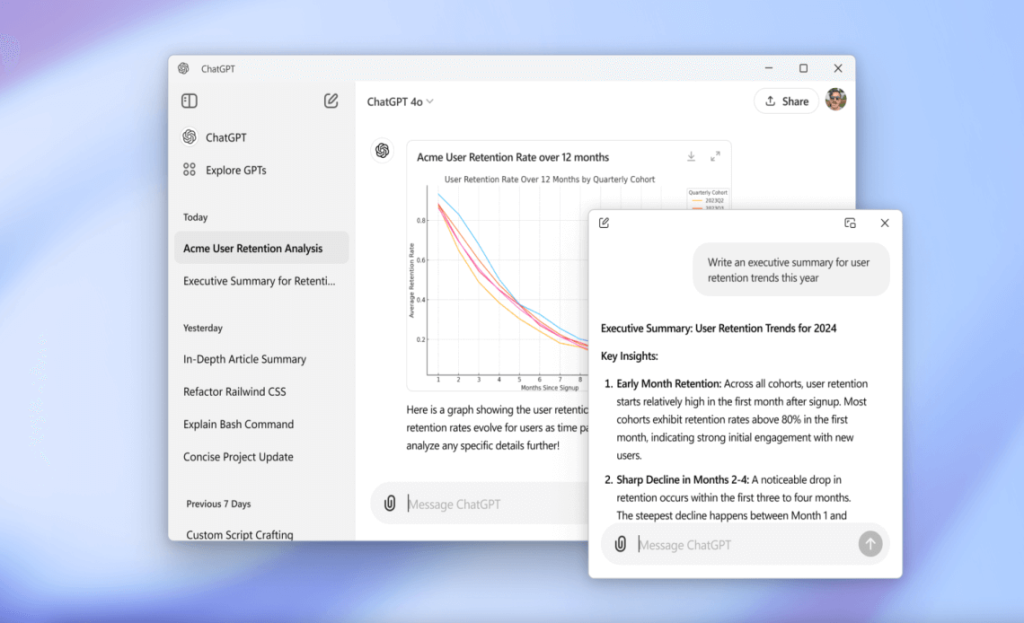
OpenAI has revealed that it has started testing a Windows-specific app for ChatGPT, its AI-based chatbot platform.
The app, however, was only available for Macs with M-series chips, leaving Windows users overlooked during this first desktop launch – which came as no surprise.
OpenAI has typically prioritised Apple’s platforms with the ChatGPT app. The iPhone had its standalone app long ahead of Android, so it was no surprise we anticipated the same for desktop.
Another factor is that Microsoft has its own AI solutions for Windows, some of which are derived from ChatGPT.
“This app brings you the newest model improvements from OpenAI, including access to OpenAI o1-preview, our newest and smartest model.” – OpenAI writes
However, OpenAI will let its users experience ChatGPT in a dedicated Windows application, rather than through a web browser interface.
The company revealed the launch of its Windows app, which you can now download and use on your desktop or laptop. However, there are certain limitations you should be aware of before installing.
The Limitations in a Short:
- To begin with, you must be a paying ChatGPT subscriber to install the Windows desktop app. A subscription to ChatGPT Plus, Enterprise, Team, or Edu will suffice.
- It’s also worth noting that the app won’t provide a comprehensive ChatGPT experience. You can access the o1 model in preview mode, which has reasoning abilities, but the Advanced Voice Mode found on web and mobile applications will not initially be supported.
- Finally, you should be aware that your company’s IT policies might affect your access to the ChatGPT app on your work Windows computer. This is mentioned by OpenAI in the fine print of its downloads portal at this link.
The ChatGPT app is built to replicate the features of the web app, giving you access to all your chats with the AI, the ability to change settings, and the option to upload files directly to the chatbot. An “Alt + Space” shortcut allows for faster access compared to the web version.
If you are eligible, you can immediately download and install the ChatGPT app for Windows by clicking on this.
The app is accessible through the Microsoft Store, and the link leads you there. As usual, you should exercise caution regarding where you download apps like ChatGPT.
There are more useful information available from this link.